
Cosmog
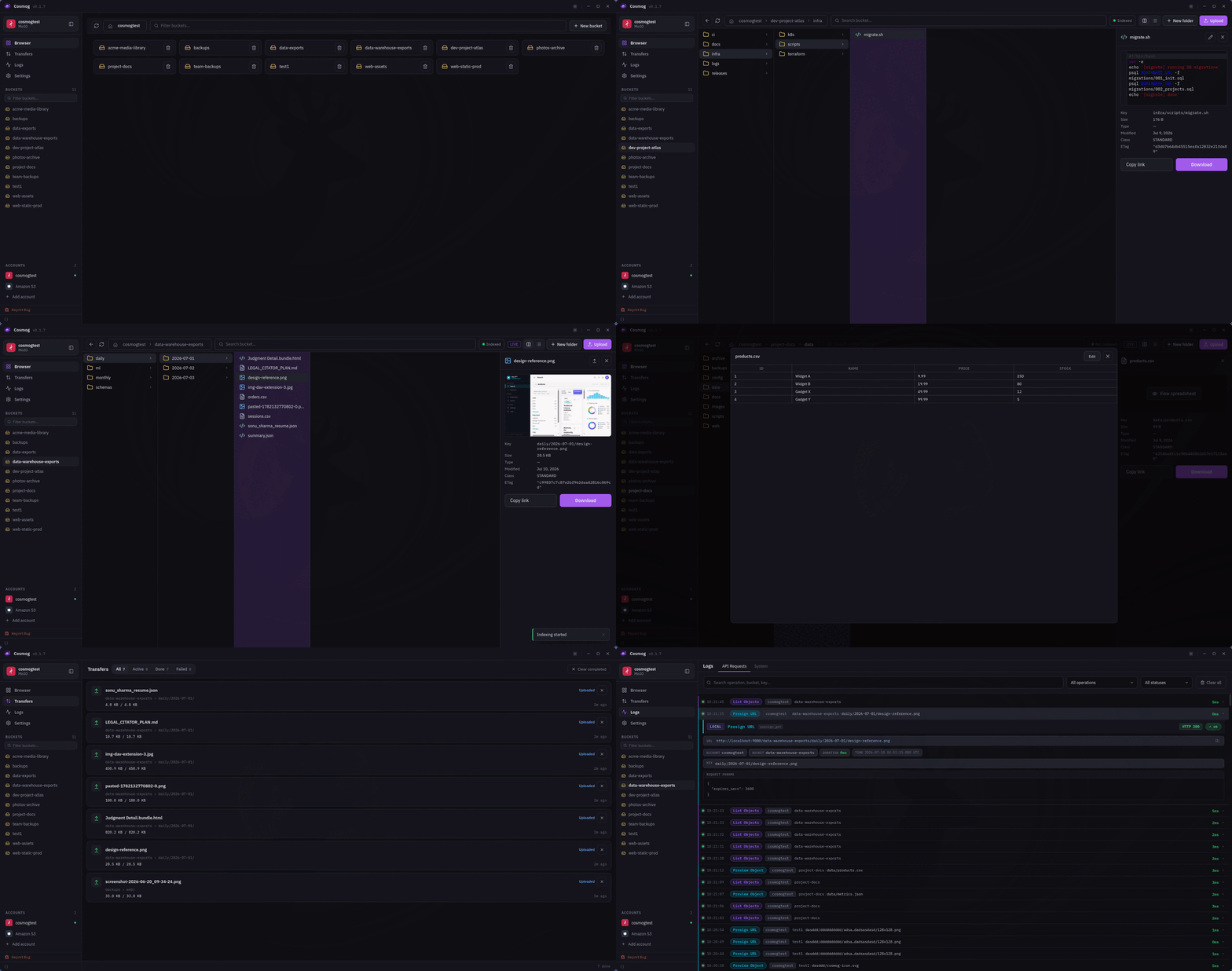
At work I needed a decent way to browse and manage S3 buckets. The usual suspects weren't great on Linux. Cyberduck's native desktop app is only available on macOS and Windows (Linux only gets the CLI), while S3 Browser is Windows-only. I was stuck using the AWS Console, which is fine... until it isn't.
Around the same time I started using Backblaze B2 for my personal backups. B2 exposes an S3-compatible API, and so do Cloudflare R2, DigitalOcean Spaces, Wasabi, MinIO, and most modern object storage providers. That got me thinking: instead of having separate tools for each provider, why not build one application that works with all of them, with a UI that doesn't feel like it was designed in 2009?
That's how Cosmog started.
Built with Tauri and a Rust backend, Cosmog is a native application that lets you connect to multiple S3-compatible providers simultaneously. Whether it's AWS S3, Backblaze B2, Cloudflare R2, MinIO, Wasabi, DigitalOcean Spaces, or any other provider exposing the S3 API, they all work from the same interface.
The goal wasn't just to browse buckets. It was to replace the entire day-to-day workflow. Browse buckets with column navigation, upload and download files with a background transfer queue, preview images and text files without downloading, edit text directly inside the application, generate presigned URLs, search full-text across buckets, and view storage analytics — all without opening a browser tab.
One thing that always annoyed me was editing files stored in object storage. Need to change a JSON config? Update a YAML file? Modify a deployment manifest? The usual workflow is always the same: download the file, open it in your editor, make the change, save it, then upload it back. It's a tiny task that somehow turns into five unnecessary steps. Cosmog lets you open supported text files directly from the bucket, edit them in-app, and save them back without ever leaving the application.
Managing multiple providers was another pain point. At work I'd have AWS accounts, while my personal backups lived on Backblaze B2, and self-hosted projects used MinIO. Every provider has its own dashboard, login, and workflow, even though they're all speaking the same S3 API underneath. Cosmog treats them all the same. You add an endpoint once, and everything just works.
More recent additions: client-side bucket encryption for sensitive data, automated one-way backup syncing to keep local folders mirrored to a bucket, and a built-in MCP server so AI clients like Claude, Codex...etc can browse and operate on your storage directly.
That's Cosmog. A native, cross-platform S3 client built for developers and anyone working with object storage regularly. No Electron, no browser tabs, no vendor lock-in. Just one application for managing virtually every S3-compatible storage provider.
Available for macOS, Windows, Linux, and Android 7.0+.